Real CAPTCHAs Don’t Ask You to Open PowerShell
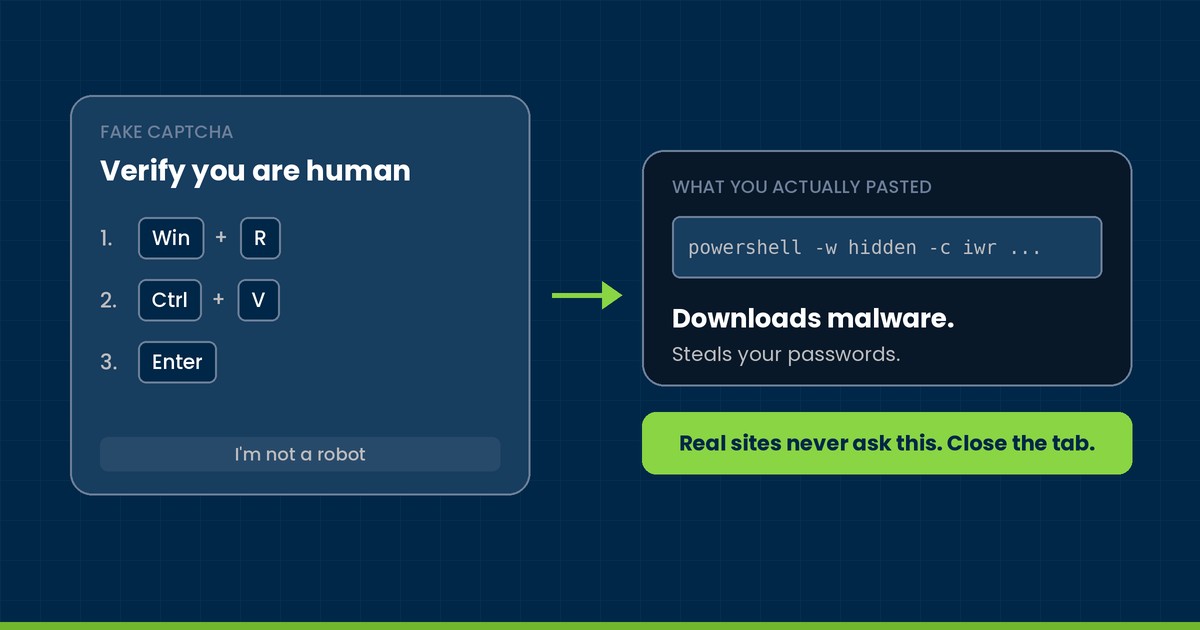
You’re on a website you’ve used a hundred times. A box pops up: “Verify you are human.” But instead of clicking a checkbox or picking out traffic lights, it tells you to press Windows + R, then Ctrl + V, then Enter.
Stop right there. That isn’t a CAPTCHA. It’s an attacker asking you to install their malware for them, and it’s one of the most effective tricks we’re seeing against small businesses right now. It’s called ClickFix, and the rule for beating it fits in one sentence: a real website will never ask you to open Run, PowerShell, Terminal, or Command Prompt and paste something in.
What ClickFix is and why it works
ClickFix is social engineering, not a software flaw. The attacker doesn’t break into your computer. They convince you to run their command yourself, using tools that are built into Windows and macOS.
That’s what makes it so effective. A malicious email attachment has to get past your filters. A ClickFix command gets typed in by a real, logged-in user, in a trusted Windows utility, so to a lot of security tools it looks like normal activity. The page usually copies the command to your clipboard behind the scenes, so you never even see what you’re pasting.
Microsoft has tracked ClickFix showing up through phishing emails, malicious ads, and compromised websites, often dressed up to look like well-known brands.
The disguises it wears
The fake CAPTCHA is the most common version. You’re told to prove you’re human, and the “proof” is pasting a command into the Run box. Whatever you paste isn’t a verification code. It’s an instruction to download and launch malware.
The fake fix is a close cousin. A page claims your browser, your PDF viewer, your Teams or Zoom client, or your whole PC has a problem, and offers a quick repair you just need to paste into PowerShell or Terminal.
The part that catches people off guard is where these show up. Attackers plant ClickFix lures on legitimate sites they’ve compromised, so a familiar web address doesn’t mean you’re safe.
The newest twist, reported this month based on Microsoft Threat Intelligence findings, gets even sneakier. A compromised site quietly loads a malicious script into your browser’s cache disguised as an image. Then the fake prompt has you run a short, harmless-looking command that finds that cached file and executes it. The command you paste is tiny. The damage isn’t.
What happens after you hit Enter
Usually, nothing you’d notice. That’s the problem. Behind the scenes, the command reaches out to the attacker’s servers and pulls down whatever they want to run next.
Often that’s an information stealer like Lumma, which scrapes saved passwords, browser sessions, and other credentials. With those in hand, an attacker can get into your email, your cloud apps, your line-of-business software, and anything else that user can reach. Some campaigns set up persistence so they survive a reboot. And ClickFix has been used as the first foothold in ransomware attacks.
This isn’t theoretical for us. In June, SentinelOne’s MDR team flagged suspicious PowerShell activity in a client environment, traced it to a user who’d interacted with a fake CAPTCHA, and caught outbound connections to known malware infrastructure. In July, they documented a full ClickFix chain that started in Windows Terminal, moved to PowerShell, and pulled down additional payloads. In both cases the response was the same: confirm the machine was cleaned, reset the user’s credentials, and block the attacker’s servers. Our partners at Blackpoint have been seeing the same playbook too, with compromised sites, fake CAPTCHAs, and PowerShell launched from Windows Terminal showing up as everyday attacker tradecraft. Fast detection is what turned those into bad days instead of disasters.
The red flags
If a website says any of these, close the tab:
- “Press Win + R”
- “Press Ctrl + V”
- “Press Enter to verify”
- “Open PowerShell (or Terminal) and paste this”
A few other warning signs: a “verification failed,” “browser error,” or “missing update” message that comes with keyboard shortcuts; a page that tells you exactly what to paste; urgent or official-sounding language pushing you to act fast; and a site you know acting in a way it never has before.
| What you see | What it means |
|---|---|
| A CAPTCHA asks you to click a box or pick images in the browser | Normal |
| A CAPTCHA asks you to open Run or Terminal | ClickFix, close it |
| A site asks you to paste a PowerShell or other command | ClickFix, close it |
| An unexpected “fix,” update, codec, or meeting repair | Treat as suspicious |
| You already pasted and ran it | Call IT now |
What to do if you run into one
- Don’t paste or run anything. Close the tab or the whole browser.
- Don’t trust it just because it’s on a site you know. Legitimate sites get compromised.
- Report it to your IT team. Send the web address and a screenshot if you can grab one.
- If you already ran the command, stop doing sensitive work on that computer and call IT right away. Tell them exactly what you did and roughly when. You won’t be in trouble. Speed matters far more than embarrassment.
- Don’t try to undo it by running more commands from that same page. That’s just round two of the attack.
What business owners should do about it
Training helps, but ClickFix is built to beat a distracted person on a busy day, so you can’t rely on people alone. You need layers.
Start with admin rights. If your staff log in as local administrators, take that away. It’s the single biggest thing you can do to limit what a pasted command can actually accomplish. Beyond that, Microsoft recommends endpoint detection and response running in block mode, cloud-delivered antivirus, automated investigation and remediation, and email protections like Safe Links and Safe Attachments. If your team doesn’t need the Windows Run dialog for their jobs, restricting it closes off the most common entry point.
And make reporting easy. The client who calls us in the first five minutes has a much better day than the one who waits until Monday.
If you’re not sure whether your environment has these protections in place, give us a call. We’ll take a look.
Brian McCarthy
President, Open Tier Systems
Sources
- Microsoft Security Blog, Think before you Click(Fix): Analyzing the ClickFix social engineering technique, Aug. 21, 2025
- Microsoft Security Intelligence, Trojan:Win32/ClickFix.SEC threat description, updated May 15, 2025
- Infosecurity Magazine, ClickFix Attack Hides VBScript Payload in Browser Cache, Oct. 6, 2026
About The Author