You Can’t Protect What You Can’t See
I had a conversation recently with a client that I keep thinking about. Good business, smart people, and an IT setup that looks fine from the front door. They’ve got two servers running Active Directory and DNS, and both of those servers have EDR on them. When we talk about security, that’s what they point to.
Here’s what they don’t have. No RMM on their workstations. No EDR on their workstations. No email filtering. Their company data lives on a couple of NAS boxes instead of a real file server. And their “backup” is those NAS devices syncing to another NAS offsite.
I want to walk through why that setup is far more exposed than it looks, because I think a lot of small businesses are sitting in the same spot and don’t know it.
Attacks don’t start at the server
Nobody breaks into a small business by attacking the domain controller first. They send an email. Someone clicks a link or opens an attachment, and now the attacker is running on a workstation.
With no email filtering, that email walks straight into the inbox. With no EDR on the workstation, nothing notices what happens next. With no RMM, nobody’s watching patch levels, nobody’s getting alerts, and there isn’t even a reliable inventory of what’s out there. The attacker has a foothold on a machine that, from a security standpoint, doesn’t exist.
The EDR on the servers is real and it’s doing its job. Its job is watching those two servers. That’s it.
Lateral movement is the whole game
Once an attacker is on one machine, they don’t stay there. They grab saved credentials, look around the network, and move from machine to machine. That’s lateral movement, and it’s exactly what EDR on endpoints is built to catch. It’s the difference between finding an intruder in the lobby and finding out three weeks later when the safe’s empty.
Here’s the part that should worry this client most. The attacker doesn’t need to touch the servers at all. The data lives on the NAS boxes, and those are reachable from any workstation with a mapped drive. Ransomware running on an unprotected laptop can encrypt every share on that NAS without ever going near the machines that have EDR. The servers stay quiet and healthy while the business’s actual data gets locked up.
NAS devices make this worse. You generally can’t run EDR on them. They tend to get firmware updates late or never. Their admin pages are often reachable from places they shouldn’t be. There are entire ransomware families built specifically to go after small business NAS brands. They’re great appliances for storing media at home. They’re not where a business should keep the files it can’t operate without.
Sync isn’t backup
This is the one I spend the most time on, because it feels like backup and it isn’t.
Syncing means “make the copy look like the original.” That’s great when the original is good. When the original gets encrypted, the sync dutifully encrypts the copy. When someone deletes a folder, the sync deletes it offsite too. When an attacker gets the credentials to one NAS, they very often have what they need to reach the second one, and wiping backups is one of the first things modern ransomware crews do before they encrypt anything.
A real backup has a few things sync doesn’t. It keeps history, so you can go back to last Tuesday. It’s isolated, so the same credentials and the same network can’t destroy it. At least one copy is immutable, meaning nobody can change or delete it, not even an admin, until its retention period runs out. And it gets tested, because a backup nobody has ever restored from is a guess.
Two NAS boxes in sync give you one copy of your data in two places. That protects you from a fire. It doesn’t protect you from the thing that’s actually most likely to happen.
“It costs too much, and I have insurance”
This is where the conversation usually ends, and it’s the part I’d push back on hardest.
Cyber insurance isn’t a security control. It doesn’t stop an email, it doesn’t catch an attacker moving between machines, and it doesn’t bring your files back. At best it helps pay for the cleanup after all of that has already gone wrong. You’re still down while the forensics firm works, you’re still paying the deductible, and you’re still explaining to your own clients why you can’t serve them this week.
And “at best” is doing a lot of work there. Read your application. Carriers ask whether you have MFA, EDR on every endpoint, email filtering, and backups that are segmented from your production network. They ask because those are the controls that keep claims from happening. If you answered yes to something that isn’t true, or your environment drifted after you signed, you’ve given the carrier a reason to deny the claim or rescind the policy entirely. That’s not hypothetical. Carriers have gone to court to void policies over exactly this kind of misstatement.
So the policy you’re counting on may require the very things you’re declining to pay for. The tools cost a few dollars per device per month. A ransomware event costs the business weeks, and the insurance only shows up if you kept your side of the deal.
What your IT provider should be doing when you say no
A good provider doesn’t stop at the first no. They should do everything they can inside the budget you’ve given them, like hardening the devices they can reach, using the security tools already built into your systems, and closing the gaps that cost nothing but time. And they should keep the gaps you’ve chosen to leave open in front of you: a scored assessment every year, a risk summary at every review, a written recap when a recommendation gets turned down, and a real quote so you know what the fix actually costs.
That isn’t nagging. It’s the only way you can make the decision with eyes open, and it draws a clear line around what your provider is actually responsible for. If something goes wrong in an area you decided not to protect, that recovery was never part of the deal, and nobody wants to sort that out in the middle of an incident.
If your provider ever offers to fill out your cyber insurance questionnaire for you, say no. Those answers are yours to attest to, and you want to know exactly what you’re telling your carrier.
Scope of coverage is the real question
The question I’d ask any business owner isn’t “do we have security?” It’s “where does our security actually reach?”
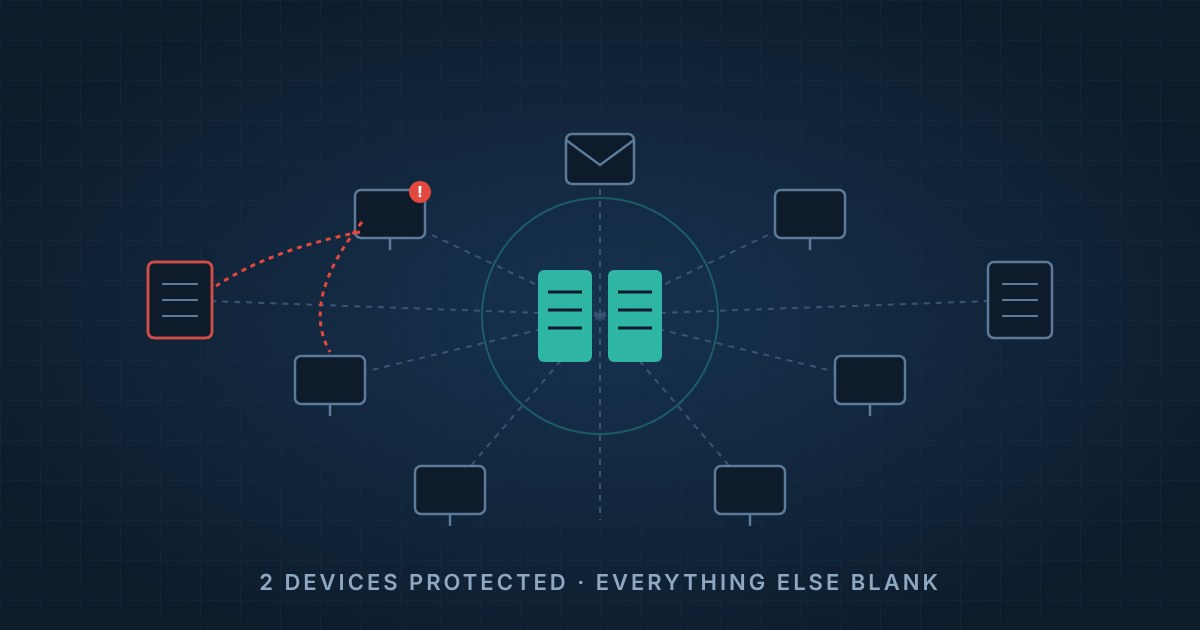
Draw a map of your network. Every workstation, every laptop, every server, every storage device, every inbox. Now color in the parts that are monitored, protected, patched, and backed up properly. For this client, two boxes get colored in. Everything else, including the devices where attacks start and the devices where the data lives, is blank.
That’s not a security program. That’s two well-protected servers in a building with the doors open.
The fix here isn’t exotic. EDR and RMM on every endpoint. Real email filtering. Data on a proper file server or a managed cloud platform with permissions you can audit. A backup with versioning, isolation, and an immutable copy, tested on a schedule. None of it’s cutting edge. It’s just making sure the coverage matches the risk.
If you’re not sure what your own map looks like, that’s a conversation worth having before someone else draws it for you.
Brian McCarthy, President, Open Tier Systems
About The Author