Plain English Is Your New Software
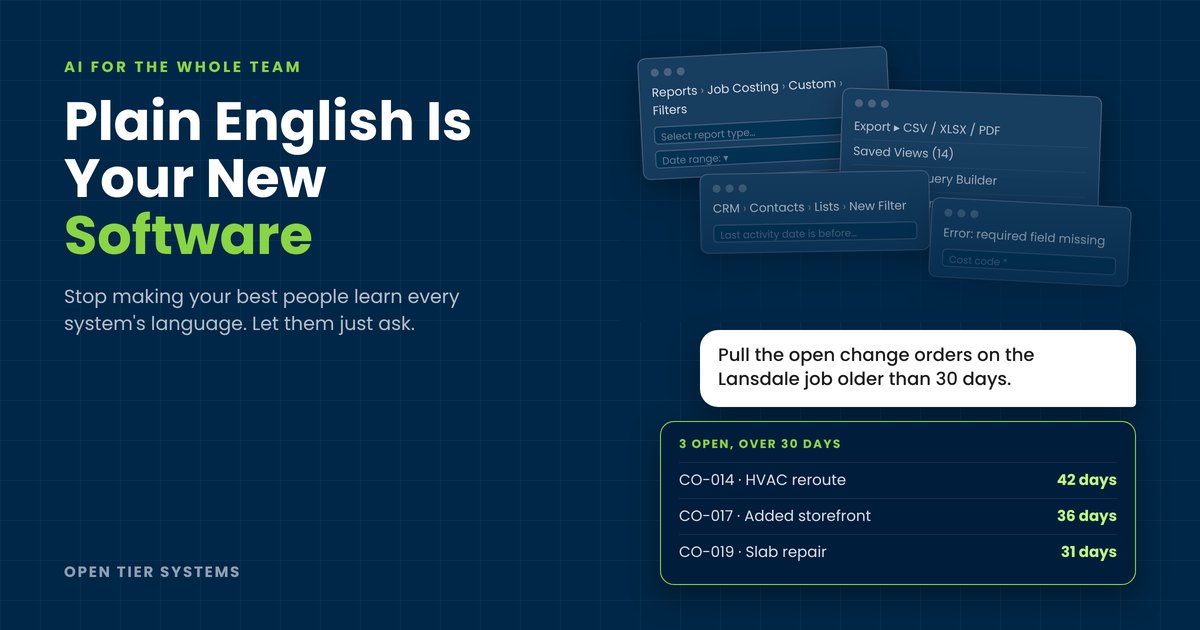
Every company has one. The project coordinator who can talk an angry property owner down in four minutes, knows every sub by first name, and keeps a job moving when everything’s on fire. Then it’s Thursday afternoon and she’s staring at the job costing screen, trying to remember which of three menus holds the change order report. Twenty minutes later she gives up and asks someone else to run it.
That isn’t a training problem. It’s a design problem, and it’s costing you more than you think.
People skills and system skills don’t come in the same package
We hire for judgment, relationships, and the ability to read a room. Those are hard to find and harder to teach. What we don’t hire for, and usually shouldn’t, is fluency in the five or six platforms every small business now runs on: accounting, project management, CRM, document storage, HR, scheduling. Each one has its own logic, its own vocabulary, and its own place it hides the button you need once a month.
So the people who are best at the human side of the job end up spending a real chunk of every week fighting the administrative side. They re-key the same data into two systems. They chase reports. They build side spreadsheets because the real system feels like a minefield. Some quietly stop using the system at all, and that’s how your data ends up wrong.
The cost hides in plain sight
You won’t find a line called “friction” on your P&L. It shows up as the senior estimator doing data entry at 7 PM. The office manager who’s the only person who knows how to fix a payroll correction. The account rep who updates the CRM once a quarter, all at once, from memory. The new hire who takes three months to get productive instead of three weeks.
Add it up across a 30-person firm and it’s easy to lose the equivalent of a full-time employee to clicking, searching, and asking for help. Worse, that time comes out of your most valuable people, the ones you’d most like doing more of what they’re actually good at.
Plain English becomes the interface
Every system in your business speaks its own language. Your accounting package has one, your project tool has another, your CRM has a third. Until now the only way to get anything out of them was for your people to become fluent in all of them. Most never will, and they shouldn’t have to.
AI changes that. Put it between your team and your systems and plain English becomes the common language. Your coordinator doesn’t hunt for the change order report. She asks for the open change orders on the Lansdale job older than 30 days. Your account manager doesn’t build a CRM filter. He asks which clients haven’t heard from us since July. The AI does the translating. The way people talk to AI turns into its own working language, one that sits on top of every system you run, and the good news is your team already speaks it.
That’s where the productivity comes from, and it scales with two things: how many of your people have AI access, and how much of your data the AI can reach. Give one person AI and you get one faster person. Give the whole team AI that’s connected to the jobs, the clients, the schedule, and the books, and everyone who’s great with people but slow with software gets to work at the speed of the people who aren’t. Limit either side and you’ve bought a nicer chatbot.
The first wins are usually small and boring, which is exactly why they matter. Time entries drafted from the day’s Teams conversations so nobody’s reconstructing their week on Friday. Meeting notes turned into tasks in the project tool before anyone leaves the room. A one-paragraph client history pulled together before a call instead of five minutes of tab-switching. An RFI response drafted from a site walk’s voice notes. None of it is flashy. All of it is time your best people get back.
We’re doing this inside our own shop right now, and we’ll be straight with you about where it stands. A lot of this works today with tools you may already license. Getting AI to work across all of your systems at once takes real groundwork on your data and integrations first. That’s a journey, not a switch, and anyone telling you otherwise is selling something.
The easiest path wins
Adoption has little to do with how powerful a tool is. People use whatever asks the least of them. Nobody learned search syntax. They typed less until the results got worse, then stopped right there. Your team will do the same thing with AI, and that’s fine. A tool that rewards the easy path is one they’ll keep using.
For AI, easy means three things. It lives where people already work, in Teams or the system they already have open, so nobody has to remember a separate app. It already knows the context: the client, the job, the history. And it takes the half-formed request someone types on their phone between site visits and still gets it right. Miss that last one and your people-first staff give up after two tries, because nobody hired them to learn prompting.
Open up the AI and the data
Here’s where most rollouts go sideways. Leadership buys a handful of AI licenses, hands them to the tech-savvy folks, and calls it a strategy. But the tech-savvy folks were already fine. The people who’d benefit most are the ones who’d never ask for it.
If AI is going to remove friction, it has to reach the whole team, and it has to reach the data they work with. It has to live inside the systems they already use, not in a separate chat window they have to remember exists. And it has to be safe enough that nobody’s wondering whether they just pasted client financials into a public chatbot. Opening up data access doesn’t mean opening the floodgates. It means governed access, permissions that match who should see what, and someone accountable for keeping it running. It’s the same discipline we bring to managed IT, applied to a new layer.
We’re living this one ourselves. I’ve been working with AI that can reach our ticketing, billing, and automation systems, and it’s changed how fast I move. Our team, meanwhile, has had a safe, approved assistant that only sees email and documents. Governed, yes. Useful for the work that actually slows them down, not really. Safe but narrow is just friction with a compliance badge. The gap between my week and theirs is the whole argument of this post, and closing it is what we’re working on right now.
Start with the friction, not the tools
Don’t start by shopping for AI products. Walk your office and ask people one question: what part of your job do you dread because the software makes it hard? You’ll hear the same handful of answers over and over. Rank them by hours lost and how many people they touch, and you’ve got your roadmap.
That’s exactly how our AI Business Assessment works. We find where your team is losing time to the computer side of the job, rank it by payback, and show you what it takes to fix it. Your people are great at the work that actually builds your business. Let’s stop making them prove they’re great at software too.
About The Author